Sessions
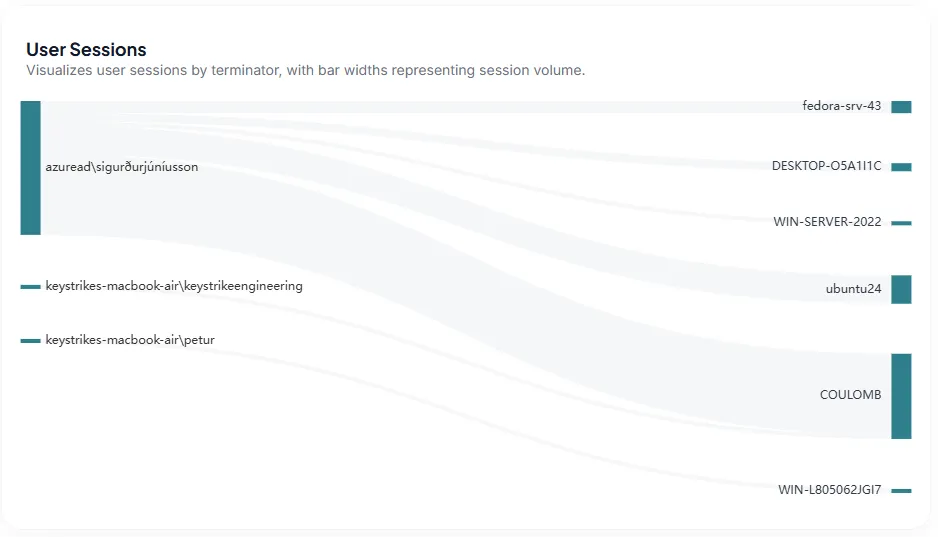
A session represents an established, secure connection between a Keystrike client and a Keystrike terminator. This page provides an overview of all sessions that occurred within the selected date range, making it easier to understand who connected, which terminators were used, and the volume of activity across your environment. The User Sessions visualization shows the relationship between users and terminators. Users are displayed on the left and terminators on the right, with connecting paths representing session activity. The width of each path indicates the relative volume of sessions, helping you quickly identify the most active users and terminators. You can interact with the visualization to narrow your view. Select a user, terminator, or the connection between them to filter the page and focus on the sessions associated with that selection.
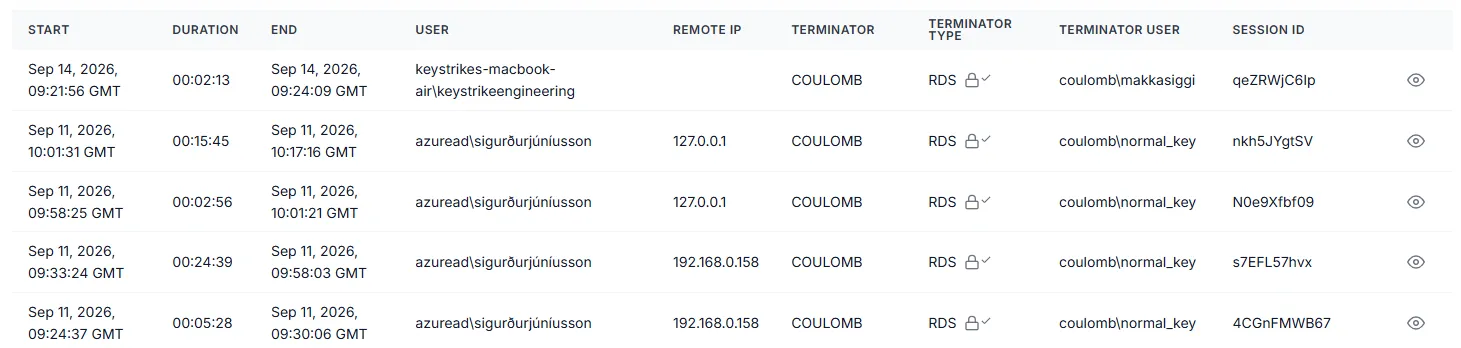
The table below provides a detailed record of the sessions in the current view, including information such as the session start and end times, duration, user, remote IP address, terminator, terminator type and user, and session ID. Click the eye icon at the end of a session row to view its full details.
Together, the visualization and session table provide both a high-level view of session activity and the detailed information needed to investigate individual sessions.