Recovery codes
1 min
In case of emergency, the recovery code may be necessary to disable enforcement mode for a terminator.
If for some reason, like misconfiguration or network issues, a terminator that is in enforcement mode is blocking all users, this recovery code will grant access.
- Connect to the device (e.g. server) running the terminator (e.g. via Remote Desktop).
- Open the recovery dialog by pressing the following key combination:
- Windows (RDP): Press Left Shift and Right Shift simultaneously, twice.
- Linux (SSH): Press Tab and Space simultaneously, four times.
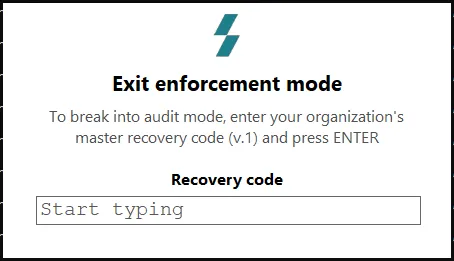
- The recovery mode dialog will appear: Here you’ll enter this code.
- The given terminator will switch to audit mode for that session.
Recovery codes are found in the Admin panel under Configuration\Recovery Codes
It is recommended that you store the latest recovery code in your organizations password vault, in case of connectivity issues to the Keystrike Admin panel.